Angels Technology

  • Subscribe to our RSS feed.
  • Twitter
  • StumbleUpon
  • Reddit
  • Facebook
  • Digg
Showing posts with label iso. Show all posts

Tuesday, October 2, 2012

Dell 5.1 esxi iso for vmware

Posted on 12:31 PM by Unknown
Here is the link to the 5.1 Dell iso
http://www.dell.com/support/drivers/us/en/04/DriverDetails/Product/poweredge-r620?driverId=XWYR5&osCode=XI51&fileId=3005015335
Read More
Posted in dell, esxi, iso, vcenter, vmware, vsphere | No comments

Thursday, September 13, 2012

IBM's customized vmware esxi iso

Posted on 2:54 PM by Unknown
Should be available here http://www-03.ibm.com/systems/x/os/vmware/esxi/


For anyone who was looking for it.


Read More
Posted in esxi, ibm, iso, vmware, vsphere | No comments

Saturday, August 11, 2012

HP custom esxi iso cd download page ESX also

Posted on 11:20 PM by Unknown
Here is a link to the iso in case you need to download the esxi image for your HP server
 http://h18004.www1.hp.com/products/servers/software/vmware/esxi-image.html


Here is the ESXi 5.x : http://www.vmware.com/go/downloads-image-hp-esxi
Here is the ESXi 4.x : https://h20392.www2.hp.com/portal/swdepot/displayProductInfo.do?productNumber=HPVM06


Here is ESX 4.x : https://h20392.www2.hp.com/portal/swdepot/displayProductInfo.do?productNumber=HPVM08


*given that the HP website isnt static, the links may expire
Read More
Posted in esx, esxi, HP, iso | No comments

Wednesday, August 1, 2012

Dell customized esxi iso

Posted on 8:48 AM by Unknown

People cant find the dell customized iso.

Here is the direct link
http://www.dell.com/support/drivers/us/en/04/DriverDetails/DriverFileFormats?DriverId=PHTJP&FileId=2988919716&productCode=poweredge-r320&urlProductCode=False

Works as of this posting. Cannot guarantee how long it will be there.
Read More
Posted in dell, esxi, iso, vmware | No comments

Saturday, July 21, 2012

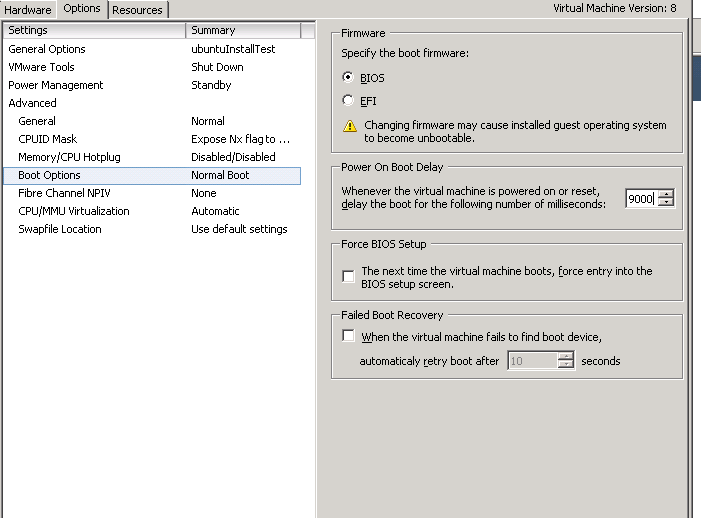
Boot virtual machine from ISO : tips on if you are having trouble :: set bios boot delay

Posted on 8:45 PM by Unknown

    If you have problems booting from an ISO or installing form and ISO here are some tips.

    Settings for deploying ISO:
    EDIT the vm settings
    Click  Options
    Go to Boot options
    Change Boot on Power Delay to 9000.
    This is so you get a 9 second delay in the boot. You can increase it more if you need more time.
    Click OK .


    Start your VM
    Press escape to enter the boot menu


    Now attach your CD ISO
    Click the cd drive and "connect to iso image on the local disk"
    Then select your ISO.
    Now highlight the CDROM DRIVE and press enter


    Now you are booting from your  cd


Read More
Posted in esxi, iso, vmware, vsphere | No comments
Older Posts Home
Subscribe to: Posts (Atom)

Popular Posts

  • Convert your physical RDM (rdmp) to a virtual RDM (rdmv)
    So you have a raw disk mapping on your virtual machine in esxi   and you wanted to convert it from a rdmp to a rdmv. Using the VMware cli...
  • VM script : To Get the VM data with Snapshot, Datastore, Total Disk Size, Cluster Name, OS Name
    Here is a good script I came across which get's some details of a virtual machine: Its from the technet script repository : here # To Ge...
  • How to run a powershell script for vmware : walkthrough
    Here is a walk through on how to make and run a powershell /powercli script The methods also apply to powershell but this is target towa...
  • convert thick disk to thin using a command line via the vmkfstools on the esxi host
    So you have a thick provisioned disk and you want to convert it to a thin provisioned disk. Another issue you have is that you don’t have ...
  • Visualesxtop problems starting the java bat file
    What is it: Visualesxtop, a new fling that gives you a graphical way to view esxtop data Get it here http://labs.vmware.com/flings/visua...
  • Vmware DRS anti affinity rules wont let you enter maintenance mode for a esxi host
    You have a DRS rule that specifies that 2 vms need to be kept apart: In this case: 250-FT and 250sql3 For larger clusters with multiple...
  • Setting your esxi host to restart automatically after crash or purple screen aka psod
    The default and recommended setting is to leave the purple screen of death up to help you notice that het host has died and also leave t...
  • Browsing Vmware logs in the DCUI (view esxi logs via console)
    Why would you view your logs in the console? Well sometimes it's the only place that is accessible if there is an error. Go to your DC...
  • How to read PSOD errors on your esxi host
    Here are some links that are useful to help you interpret why psod errors are happening. Machine Check Exception errors: mce http://kb.vmwar...
  • Migrating VMs : don’t use OVA/OVF?
    Don’t use OVF to move virtual machines around in your environment? Interesting thread here, http://communities.vmware.com/message/2110421 ...

Categories

  • 5.1
  • backup
  • cloud
  • cluster
  • command line
  • console
  • converter
  • cpu
  • datacenter
  • datastore
  • datastore. rdm
  • DCUI
  • dell
  • disaster recovery
  • display
  • DR
  • e1000
  • e1000e
  • ec2
  • esx
  • esxi
  • esxtop
  • extent
  • Good for enterprise
  • HA
  • hcl
  • host
  • HP
  • ibm
  • iometer
  • iscsi
  • iso
  • linked mode
  • logs
  • MAC
  • memory
  • NFS
  • NIC
  • NTP
  • ova
  • ovf
  • p2v
  • pcie
  • performance
  • phone
  • powercli
  • powershell
  • PSOD
  • raid
  • RDM
  • resource pool
  • rvtools
  • scsi
  • sddc
  • snapshots
  • SQL
  • SRM
  • ssh
  • storage
  • svmotion
  • syslog collector
  • v2v
  • vapp
  • vcenter
  • vcloud
  • vcp
  • veeam
  • VI console
  • vm
  • vmdk
  • VMFS
  • vmkfstools
  • vmotion
  • VMUG
  • vmware
  • vmware tools
  • vmware.esxi
  • vmxnet3
  • vsphere
  • vum
  • web client
  • windows

Blog Archive

  • ▼  2013 (28)
    • ▼  October (2)
      • Interesting look at Win cpu usage vs Vmware CPU usage
      • Windows 7 - Adding drivers to the INF folder
    • ►  September (1)
    • ►  August (1)
    • ►  July (1)
    • ►  June (14)
    • ►  May (1)
    • ►  April (1)
    • ►  March (5)
    • ►  February (1)
    • ►  January (1)
  • ►  2012 (138)
    • ►  December (2)
    • ►  November (13)
    • ►  October (26)
    • ►  September (19)
    • ►  August (35)
    • ►  July (34)
    • ►  June (9)
Powered by Blogger.

About Me

Unknown
View my complete profile